Skip to content

Hybrid events

One live translation for the room and the livestream

Baian provides hybrid event interpretation on attendees’ phones, translated text on venue screens and livestream captions through OBS. Your AV operator plans the room and broadcast outputs separately. Send a clean stage feed into Baian and use a separate route for any translated broadcast audio.

How far behind the speaker?About 2.4 seconds with Baian. Lower is better.

How often Baian was preferredOver professional translations · English into each language

  • Arabic 58%preferred
  • Hindi 65.5%preferred
  • Korean 61.5%preferred

The line marks 50%: an even split.

Estimates; interpreter timing comes from a separate study. Sources and methods

On their own phones

What do attendees get?

In the room
Phone text or supported translated audio
Venue screen
Projector view with adjustable text
Livestream
Camera Overlay in OBS, confirm access
App to download
None. It opens in the phone’s browser
Illustration. Attendees see the languages you choose for the event.

Against interpreters

What can’t a booth do?

  • No breaks

    BaianRuns for the whole session.

    InterpretersSwap about every 30 minutes.

  • Doesn’t tire

    BaianNo fatigue, however long it runs.

    InterpretersIn one study, meaning errors rose after 30 minutes.

  • Sentence-by-sentence translation

    BaianBuilt to translate the speech, not summarise it.

    InterpretersIn one study, omitted meaning in 350 of 590 segments.

  • Many languages at once

    BaianSeveral languages from one stage feed.

    InterpretersOne interpreter team per language.

  • A saved transcript

    BaianThe speech and each translation, saved.

    InterpretersSeparate transcription needed.

  • Listen back

    BaianDownload the translated audio afterwards.

    InterpretersOnly if someone records the booth.

For your AV team

Where can the translation go?

Phones, venue screens, your livestream or an existing headset system, all from one stage feed. A transcript is saved afterwards.

Connection guide for AV teams
Your sound deskOne stage feed
  • Audience phonesRead or listen after scanning a QR code.
  • Venue screensLive captions on a projector or LED wall.
  • LivestreamA caption overlay for OBS.
  • Headset systemTranslated audio through an audio interface.
  • TranscriptThe whole session, saved afterwards.

Planning your event

What should you plan for?

Plan for the broadcast audience as well as the room

WHO’s 79th World Health Assembly page says proceedings are webcast live with interpretation in six languages. UEG Week 2026’s attendance page covers onsite Barcelona attendance and its online congress platform, naming English as the official language. Identify the translation needs of both audiences.

Generali retained livestream interpretation for 23 April 2026 in English, French, German and Spanish, alongside Italian Sign Language and Italian subtitling. Plan sign-language interpretation separately from Baian’s spoken-language translation.

Check the translated screen from the venue seats

The room audience can follow Baian through phone text or supported headphone audio, replacing agreed interpreter booths and receiver distribution. Projector view puts translated text on the venue screen.

Adjust its text size and colour, then position the QR code where attendees can scan it. Inspect that picture from the back of the room while a speaker answers an audience question.

Put the Camera Overlay in the finished OBS scene

Confirm Camera Overlay access with the booking, then add its link as an OBS Browser Source for livestream captions. Translated audio needs a separate route. Agree which language the stream will carry and listen to that output on a remote viewing device.

Check the text in the final streamed picture during the same passage. Test the projector and the broadcast independently so both audiences can follow the programme.

Trace the question from the room to the stream

Include the audience question microphone in the translation feed. Rehearse a question and answer while someone checks the phone channel in the venue and another checks the broadcast. Agree how the presenter handles an interruption that affects only one of those outputs.

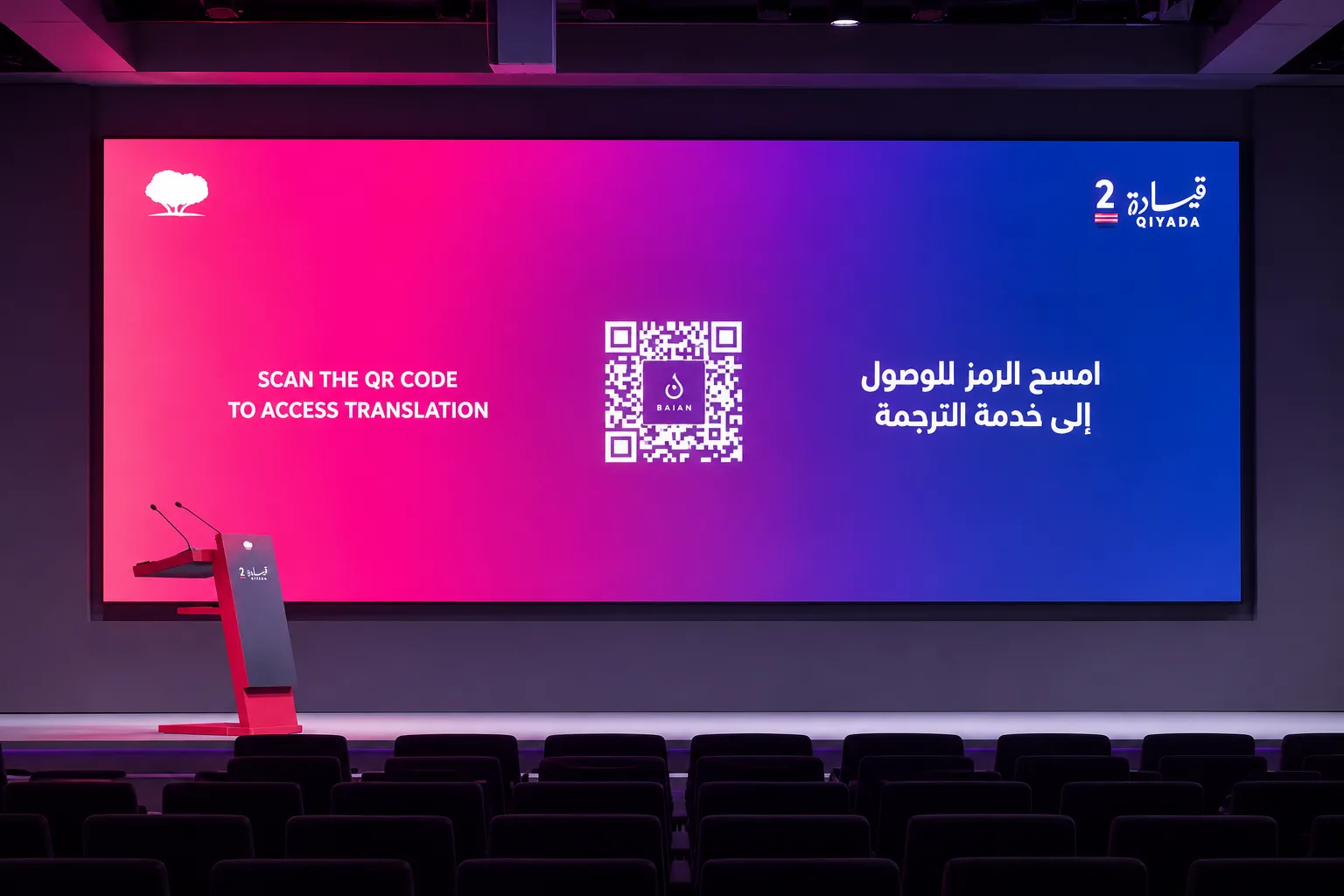
Customer story · QIYADA, Doha

Two days. One QR code on the stage screen.

At Qatar Foundation’s QIYADA conference, attendees scanned the code and followed Arabic and English on their own phones. The interpreter booths were taken down.

Dates
25 and 26 Sept 2026
Languages
Arabic, English
Booths
None
Read the story
The QIYADA stage screen showing Baian’s QR code, asking attendees in English and Arabic to scan it for translation

Want to test it with your event?

Tell us your languages, audience size and sound setup. For up to 10,000 listeners at once, we’ll confirm capacity and support before you book.

Discuss your event ↗WhatsApp Explore audience languages →
Sources and methodsChecked 11 October 2026
  • Baian against professional translators (FLoRes)October 2026

    Caption Tool scored above the translators in Hausa, Swahili, Tamil and Urdu (preferred on 67% to 75% of sentences). Baian’s live interpreter had about the same overall quality in Arabic, Hindi and Korean.

  • Live delay13 to 15 October 2026

    Median 2.1 seconds across 53 recordings in 15 languages (1.3 to 2.7 seconds per recording).

  • How quickly words appear13 to 15 October 2026

    Estimated medians: the speaker’s words appear in their own language about 1.0 seconds after they are spoken, and the first translation covering a word about 2.4 seconds after it.

  • European Parliament interpreters2019

    Median 2.69 seconds behind the speaker, across 180 speeches.

  • Interpreters on long turns1998

    About 30 minutes is the recommended turn. Meaning errors rose steadily after 30 minutes on task (pilot study, five professionals).

  • What simultaneous interpreters leave out2024

    Part of the meaning was missing in 350 of 590 speech segments.