Skip to content

For event organisers and AV teams

AI interpretation, engineered for accuracy.

Baian translates live talks using context to follow the speaker’s meaning. At conferences, lectures and events, attendees read or listen on their own phones.

How often Baian was preferredOver professional translations · English into each language

  • Arabic 58%preferred
  • Hindi 65.5%preferred
  • Korean 61.5%preferred

The line marks 50%: an even split.

Sources and methods

How it works

From the microphone to your audience.

The microphone sends the speech to Baian. Baian turns it into text, translates the meaning, and sends it to the people following. The speaker carries on as usual.

From the sound desk to every outputOne stage feed. Several places it can go.

Sound deskClean stage feed
Baian on a laptopNeeds internet
  • Audience phonesQR code or link
  • Venue screensProjector view
  • LivestreamOBS caption overlay
  • Headset systemThrough an audio interface
  • TranscriptSaved after the session
Keep translated playback out of the stage-microphone feed so Baian doesn’t translate itself.

Inside the process: how Baian follows the meaning

For your team

How do you start a session?

You need a laptop or tablet, a connection to your microphone or mixer, and internet.

  1. 01

    Connect the stage audio

    Plug the sound desk into a laptop by USB, or use an audio interface.

  2. 02

    Open Baian on a laptop or tablet

    Choose your languages and press start.

  3. 03

    Share the QR code

    Attendees scan it and follow on their own phones.

For your audience

What does everyone else do?

Scan the QR code and choose a language. They can read on their phone, or listen through headphones where audio is available. No app or account needed.

  1. Open the cameraScan the event’s QR code

    1. Scan

  2. Choose a language
    • عربي
    • Français
    • Türkçe
    • اردو

    2. Choose a language

  3. TürkçeNasıl takip etmek istersiniz?
    DinleKulağınızda anlık çeviri
    OkuEkranda canlı altyazı

    3. Listen or read

One speaker
  • عربي
  • Français
  • Türkçe
  • اردو
Everyone follows the same talk in the language they choose. Screens are illustrative; listening is available in supported languages.

Engineered for accuracy

Does it follow the meaning?

Baian uses the recent speech as context when it translates. We test the result against professional translations, as well as measuring how quickly the text appears.

Translation follows in about 2.4 seconds.Seconds behind the speaker. Lower is better.

Estimates; interpreter timing comes from a separate study. Sources and methods

Compared with interpreters

What changes during your event?

  • No breaks

    BaianRuns for the whole session.

    InterpretersSwap about every 30 minutes.

  • Doesn’t tire

    BaianNo fatigue, however long it runs.

    InterpretersIn one study, meaning errors rose after 30 minutes.

  • Sentence-by-sentence translation

    BaianBuilt to translate the speech, not summarise it.

    InterpretersIn one study, omitted meaning in 350 of 590 segments.

  • Many languages at once

    BaianSeveral languages from one stage feed.

    InterpretersOne interpreter team per language.

  • A saved transcript

    BaianThe speech and each translation, saved.

    InterpretersSeparate transcription needed.

  • Listen back

    BaianDownload the translated audio afterwards.

    InterpretersOnly if someone records the booth.

For AV teams

Can it work with your screens and livestream?

Yes. Send captions to venue screens and your livestream, or translated audio to an existing headset system.

Customer story · QIYADA, Doha

Two days. One QR code on the stage screen.

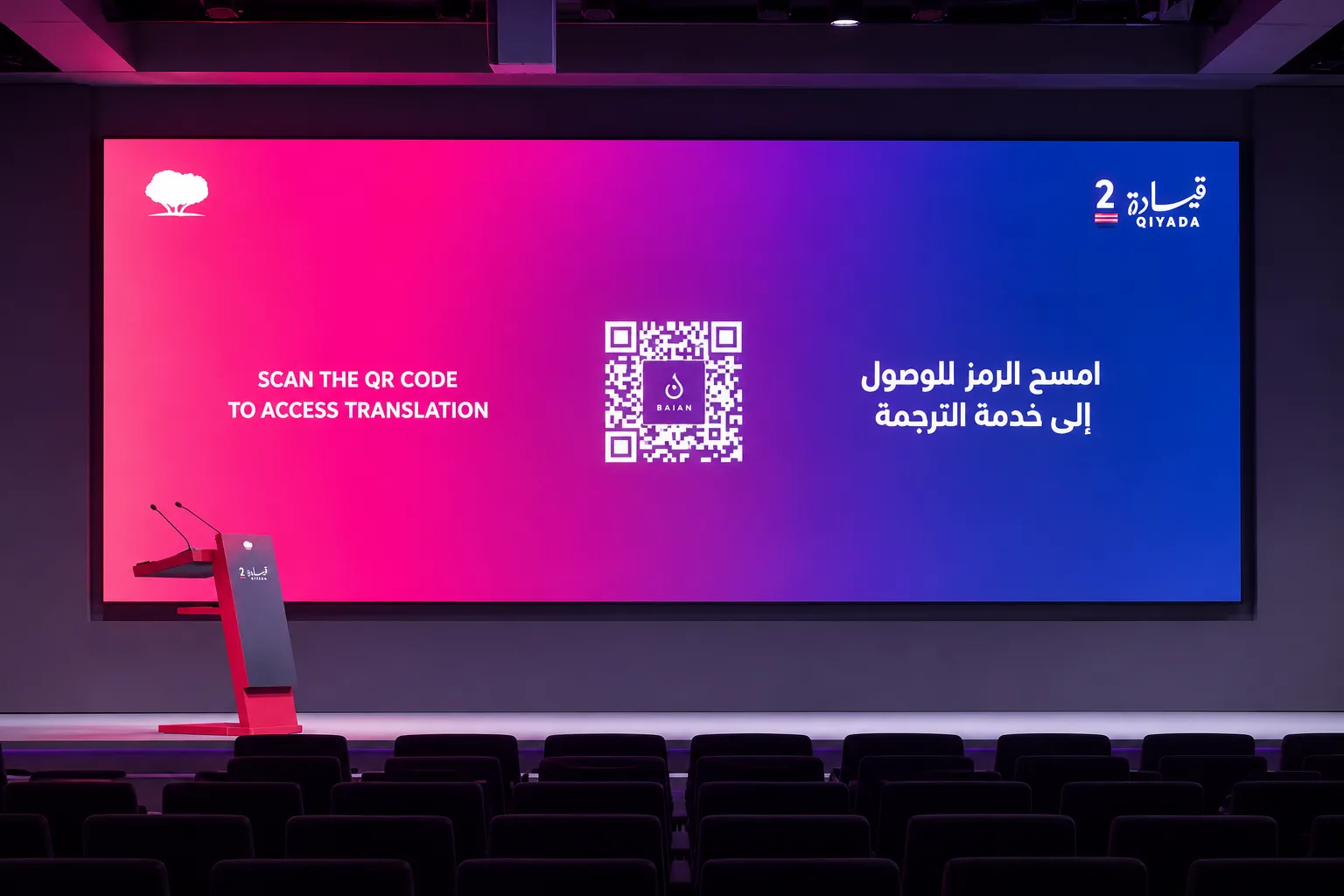
At Qatar Foundation’s QIYADA conference, attendees scanned the code and followed Arabic and English on their own phones. The interpreter booths were taken down.

Dates
25 and 26 Sept 2026
Languages
Arabic, English
Booths
None
Read the story
The QIYADA stage screen showing Baian’s QR code, asking attendees in English and Arabic to scan it for translation

Plan your event

Guides for your event.

Questions

What event teams ask.

Do attendees need to download an app?

No. They scan your QR code, choose a language and read or listen in their phone’s browser. They don’t need to create an account.

How quickly does the translation appear?

About 1 second for the speaker’s own words and 2.4 seconds for translated text, based on our recordings. These are feed estimates, not phone-screen measurements. The text can change as the speaker continues.

Can it replace our interpreters?

It can, if your event allows it. Try Baian with a recording of your own speakers first, and check any requirements for accredited interpreters. We can help you plan where to use Baian and where to keep a human interpreter.

Can we keep our headset system?

Yes. Baian can send translated audio to your headset transmitters through an audio interface. Your AV team should test it on the real receivers before the day.

How many people can follow at once?

Events can plan for up to 10,000 listeners across several languages. Tell us your numbers before you book and we’ll confirm capacity and support.

Can you guarantee zero errors?

We can’t put “zero errors” in the guarantee. (Psst. We like our chances.) Bring your own audio and put Baian to the test. We’ll check names, specialist terms and your sound feed before the event.

Does it work offline?

No. The laptop or tablet running Baian, and your audience’s phones, need an internet connection.

Can it speak in the speaker’s own voice?

Listeners hear an AI voice today. Speaker voice cloning is experimental and coming soon.

Hear it with your own event audio.

Bring a short recording, your languages and your audience size. We’ll show you the listener experience.

Arrange a demo WhatsApp
Sources and methodsEvery number on this page, with its test and date
  • Live speech recognition (AssemblyAI real-time benchmark)AssemblyAI runs 25 August to 23 September 2026; Baian runs 13 to 15 October 2026

    1st in Arabic (5.1%) and Korean (2.9%), 2nd in Russian and Danish. Fewer errors than all three OpenAI real-time models in 13 of the 14 languages we publish.

  • Baian against professional translators (FLoRes)October 2026

    Caption Tool scored above the translators in Hausa, Swahili, Tamil and Urdu (preferred on 67% to 75% of sentences). Baian’s live interpreter had about the same overall quality in Arabic, Hindi and Korean.

  • Live delay13 to 15 October 2026

    Median 2.1 seconds across 53 recordings in 15 languages (1.3 to 2.7 seconds per recording).

  • How quickly words appear13 to 15 October 2026

    Estimated medians: the speaker’s words appear in their own language about 1.0 seconds after they are spoken, and the first translation covering a word about 2.4 seconds after it.

  • European Parliament interpreters2019

    Median 2.69 seconds behind the speaker, across 180 speeches.

  • Interpreters on long turns1998

    About 30 minutes is the recommended turn. Meaning errors rose steadily after 30 minutes on task (pilot study, five professionals).

  • What simultaneous interpreters leave out2024

    Part of the meaning was missing in 350 of 590 speech segments.

All live results